
Professional Photo Editing Services for eCommerce Brands | BrightImage Studio
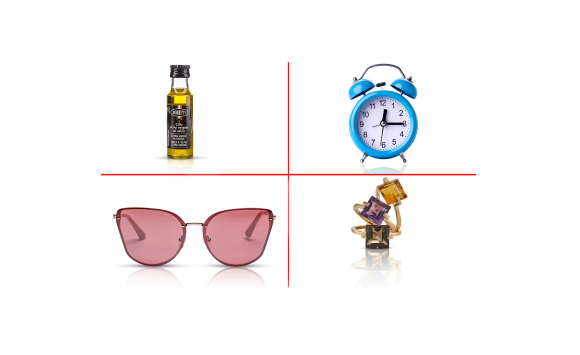
Professional Photo Editing Services: The Complete Guide for eCommerce Brands, Photographers, and Visual-First Businesses
Trusted by 1,000+ brands worldwide • 1M+ images edited • 24-hour delivery • 4.9/5 client rating
The Hidden Cost of Bad Product Photography
You spend weeks sourcing the perfect product. You set up a studio shoot. The photos come back and they look… fine. Good enough. Maybe.
But fine isn’t what converts.
Studies consistently show that product image quality is the number one factor influencing online purchase decisions. More than price. More than reviews. Shoppers can’t touch, smell, or try your product — your images are your product.
When those images are flat, inconsistent, cluttered, or poorly lit, they quietly drain your revenue every single day.
Professional photo editing doesn’t just clean up your images. It transforms raw photography into conversion assets — clean, consistent, brand-aligned visuals that build trust and drive sales.
This guide covers everything you need to know about professional photo editing services: what they include, how they work, how to choose the right partner, and why the investment pays for itself many times over.
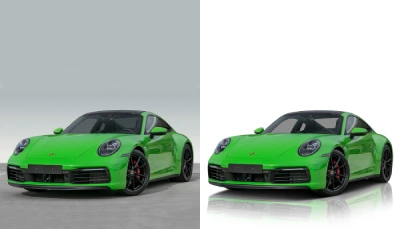
Product images edited by BrightImage Studio
Why Professional Photo Editing Is a Business Investment, Not an Expense
Many brands treat photo editing as a cost to minimize. That’s a strategic mistake.
Consider what high-quality product images actually do:
- Increase conversion rates by 40% or more on product pages (Shopify internal data)
- Reduce return rates by setting accurate visual expectations
- Improve Google Shopping and Amazon ranking through image quality signals
- Build brand perception and justify premium pricing
- Reduce ad spend wasted on low-CTR creatives
A single product hero image that converts 2% better can generate thousands of dollars in additional revenue over a year. The editing cost per image? Often $1–5.
The math is simple. The brands that understand this invest in professional editing. Those that don’t wonder why their competitors are winning.
The Visual Trust Signal
Consumers make unconscious trust judgments within 50 milliseconds of seeing a product image. Inconsistent lighting, visible background noise, color casts, or distracting elements all register as red flags — even when the buyer can’t articulate why.
Professional retouching eliminates those trust-breaking signals. It makes your brand look like it belongs on the same page as the industry leaders — because visually, it does.
BrightImage Studio has edited over 200,000 images for brands ranging from independent Etsy sellers to global fashion labels. Every image gets the same standard of care.
The 12 Professional Photo Editing Services That Drive Revenue
Not all editing is the same. Different industries, products, and use cases require different techniques. Here’s a clear breakdown of the core services and what each one accomplishes.
|
Service |
Best For |
Key Outcome |
|
eCommerce, Amazon, Shopify |
Clean white/transparent background for marketplace compliance |
|
|
General eCommerce, D2C brands |
Scratch removal, color accuracy, polished finish |
|
|
Jewelry brands, luxury retail |
Metal sparkle, stone brilliance, luxury-level finish |
|
|
Fashion, apparel brands |
Clean garment shape without visible mannequin/model |
|
|
Studios, beauty brands, agencies |
Natural skin enhancement, professional portraits |
|
|
Beauty, fashion, editorial |
Pro-skin finish, makeup enhancement, campaign-ready images |
|
|
Wedding photographers |
Consistent color grading, light enhancement, timeless look |
|
|
Real estate photographers |
Sky replacement, HDR blending, virtual staging |
|
|
Studios, archival clients |
Repair damaged, old, or faded photographs |
|
|
Creative agencies, brands |
Composite work, surreal effects, campaign imagery |
|
|
Brands, influencers, agencies |
Platform-optimized, scroll-stopping visuals |
|
|
Marketing teams, agencies |
Consistent brand palette, layout, campaign visuals |
Service Deep Dives: How Each Service Works and Why It Matters
1. Background Removal Service
Background removal is the most requested service in eCommerce photo editing — and the most technically demanding when done properly.
What the process involves:
- Manual clipping path creation around every edge of the subject
- Hair and fur masking using advanced channel separation techniques
- Edge refinement to eliminate halo effects and fringing
- Output as PNG (transparent), JPEG (white), or custom background
Why it matters:
- Amazon, eBay, and most major marketplaces require pure white backgrounds
- Consistent backgrounds across a product line look professional and intentional
- Transparent PNGs allow flexible use in ads, banners, and composites
Common mistakes brands make:
- Using automated AI tools that leave rough edges on hair, fabric, or complex shapes
- Accepting images with grey or off-white backgrounds instead of true white (#FFFFFF)
- Ignoring shadow creation after background removal, leaving products looking flat
The professional approach:
At BrightImage Studio, every background removal is done manually in Adobe Photoshop by trained retouchers. We use pen tool precision for hard edges and frequency separation for soft edges like hair, fur, and fabric — achieving results that AI tools simply cannot match.
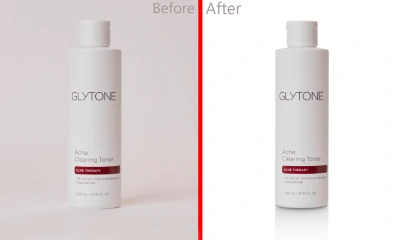
Background removal with manual clipping path — clean white background ready for Amazon listing
2. Product Photo Retouching
Product retouching goes beyond background work. It’s the craft of making a product look exactly as good as it does in person — or better.
What professional retouching covers:
- Dust, scratch, and blemish removal from product surfaces
- Color correction and tone balancing for accurate representation
- Reflection and highlight management on glossy surfaces
- Shadow and depth enhancement for visual weight
- Label and packaging straightening and cleanup
Industry impact:
A Baymard Institute study found that 56% of online shoppers have returned a product because it didn’t match the photos. Accurate, detailed retouching isn’t just about aesthetics — it directly reduces returns and protects your reputation.
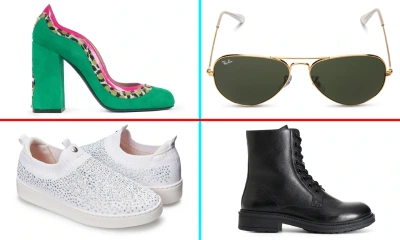
Product retouching — color corrected, cleaned, and polished for premium presentation
3. Jewelry Retouching Service
Jewelry is arguably the most technically demanding product category to edit. Metal surfaces, gemstone clarity, and luxury finish require specialized expertise that general retouchers lack.
What high-end jewelry retouching includes:
- Diamond and gemstone brilliance enhancement
- Metal surface polishing — gold, silver, platinum tone refinement
- Scratch, dust, and fingerprint removal at macro level
- Color grading to match brand tone (warm gold vs. cool silver)
- Background cleanup for white or styled presentations
Why this service commands premium pricing:
A jewelry image that looks dull or slightly off-color can cost thousands in lost sales. High-end buyers expect to see brilliance, depth, and craftsmanship in the image — the same way they’d see it in-store under professional lighting.
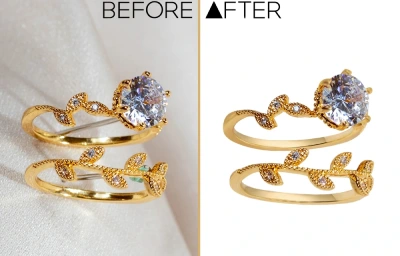
Jewelry retouching — diamond sparkle, metal polish, and luxury-grade finish
4. Ghost Mannequin (Invisible Mannequin) Service
The ghost mannequin technique — sometimes called the invisible mannequin effect — is essential for fashion and apparel brands. It shows garments in a natural, wearable shape without the cost of a live model shoot.
How it works:
- Garment photographed on mannequin (front, back, interior collar/hem)
- Mannequin removed digitally through masking and compositing
- Interior lining inserted from the inside-out shot
- Seams, wrinkles, and shape refined for garment symmetry
- Final image shows a clean, hollow garment ready for product listing
Why fashion brands rely on it:
- Saves model photography costs on every SKU
- Consistent look across entire product catalog
- Complies with most marketplace standards
- Focus stays on the garment, not the model
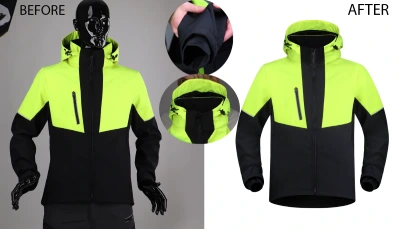
Ghost mannequin service — clean garment presentation with invisible mannequin effect
5. Skin & Beauty Retouching
Beauty retouching sits at the intersection of technical skill and artistic judgment. Done well, it enhances without erasing — the subject looks their best, not like a different person.
Professional techniques used:
- Frequency separation for skin texture preservation
- Dodge and burn for depth and dimension
- Pro-Skin masking for natural finish
- Makeup enhancement — lip, eye, and contour refinement
- Glow and tone refinement for campaign-ready output
The ‘natural vs. over-edited’ balance:
The most common complaint about beauty retouching is over-editing — skin that looks plastic, eyes that look artificially enlarged. BrightImage retouchers are trained to deliver a high-end finish that passes as natural, meeting the standards of fashion magazines and major beauty campaigns.
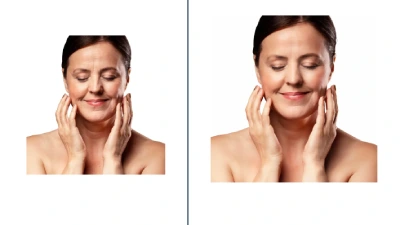
Beauty retouching — natural skin enhancement, makeup refinement, campaign-quality output
6. Real Estate Photo Editing
Real estate photographers face unique challenges: mixed lighting, blown-out windows, cluttered interiors, and dull skies. Professional editing turns ordinary property shots into listing-ready visuals.
What real estate editing covers:
- HDR blending for balanced indoor/outdoor exposure
- Sky replacement for flat or overcast exterior shots
- Virtual staging — adding furniture to empty rooms
- Object and distraction removal
- Color correction for accurate interior representation

Real estate editing — HDR blending, sky replacement, and interior color correction
DIY vs Professional Photo Editing: An Honest Comparison
|
Factor |
DIY Editing |
Professional Service |
|
Cost per image |
$5–25 (time cost) |
$0.50–5.00 |
|
Turnaround |
Hours to days |
12–24 hours |
|
Consistency |
Variable |
Standardized across catalog |
|
Software needed |
Photoshop, Lightroom ($$$) |
Included |
|
Skill ceiling |
Limited by operator skill |
Expert retouchers |
|
Scalability |
Breaks at volume |
Handles 1 to 100,000 images |
|
Revision process |
Redo from scratch |
Structured revision rounds |
|
EEAT / brand trust |
Often lower quality |
Professional output |
The break-even calculation is straightforward. If a business owner or photographer earns $50/hour and takes 20 minutes to edit one image, that’s $16.67 per image in time cost alone — before factoring in software subscriptions, learning curves, and inconsistency across batches.
Outsourcing photo editing at $1–25 per image to a professional service isn’t just more affordable. It frees the client to focus on higher-value work: shooting, selling, and growing.
AI Editing Tools vs Manual Retouching
AI-powered editing tools like Adobe Firefly, Luminar AI, and Remove.bg have improved dramatically. But there’s a ceiling to what they can achieve.
|
Capability |
AI Tools |
Manual Retouching |
|
Simple backgrounds |
Good |
Excellent |
|
Complex hair/fur edges |
Poor |
Excellent |
|
Jewelry sparkle enhancement |
Not capable |
Specialist-level |
|
Ghost mannequin construction |
Not capable |
Standard service |
|
Color grading for brand consistency |
Approximate |
Precise |
|
Skin retouching (natural look) |
Plastic appearance risk |
Nuanced, natural |
|
Batch consistency |
Variable |
Standardized |
|
Custom creative compositing |
Not capable |
Full capability |
AI tools are useful for quick, low-stakes edits. For product catalogs, campaign imagery, jewelry, fashion, or any brand-facing visual, manual retouching by trained professionals consistently delivers superior results.
Industry-Specific Editing: Who Needs What
eCommerce & Amazon Sellers
- Pure white (#FFFFFF) background compliance for Amazon, eBay, Etsy
- Consistent image sizing (typically 2000x2000px at 72dpi minimum)
- Multiple angles: hero image + lifestyle + detail shots
- Infographic overlays for product feature callouts
Fashion & Apparel Brands
- Ghost mannequin for consistent catalog presentation
- Color accuracy across fabrics (critical for returns prevention)
- Wrinkle smoothing and fabric texture enhancement
- Model retouching for campaign images
Jewelry Brands
- Macro-level surface cleaning and sparkle enhancement
- Metal tone matching across product lines
- Studio white or lifestyle background preparation
- High-resolution output for print and large-format display
Real Estate Photographers
- HDR blending and sky replacement at scale
- 24-hour turnaround to meet listing deadlines
- Virtual staging for vacant properties
- Consistent style across an agent’s entire portfolio
Professional Photographers & Studios
- Batch editing with consistent style and tone
- Culling and selection assistance
- Wedding album preparation and sequencing
- Headshot and portrait retouching at volume
How Image Quality Directly Affects SEO and Conversions
Most brands think about photo editing in terms of aesthetics. But the impact runs deeper — all the way into search rankings and revenue metrics.
Image SEO Signals
- Google Image Search is a significant traffic driver for product and fashion brands
- Properly named image files (e.g., ‘red-leather-trench-coat-product.webp’) rank for relevant queries
- Alt text optimization connects images to keyword-driven search intent
- WebP format and proper compression improve Core Web Vitals (LCP scores)
- High-quality images earn more backlinks and social shares, which drives domain authority
Conversion Rate Impact
Conversion research consistently points to image quality as the primary lever on product pages:
- Zoom-capable, high-resolution product images increase conversion by up to 58% (BigCommerce)
- Multiple angle views reduce cart abandonment
- Background consistency across a catalog increases perceived brand quality
- White background images outperform lifestyle images on most marketplace platforms
A 1% improvement in conversion rate on a store doing $500K/year in revenue = $5,000 more revenue annually. A catalog retouch costing $2,000 could pay for itself within weeks.
What to Look for in a Professional Photo Editing Company
Not all editing services are equal. Here’s a framework for evaluating any provider — including us.
Non-Negotiable Quality Indicators
- Manual editing (not AI-only) for professional-grade output
- Photoshop-certified or demonstrably expert retouchers
- A structured revision policy (minimum 2 free revision rounds)
- Consistent output quality across different retouchers
- Clear file format and delivery options (PNG, JPEG, PSD, TIFF)
Service and Communication Standards
- Defined turnaround times with on-time delivery track record
- Dedicated account manager or direct communication channel
- NDA and data privacy compliance for sensitive product images
- Trial or sample edit option before committing to a large batch
Questions to Ask Before Hiring
- Can I see samples specific to my product type?
- What software and techniques do your retouchers use?
- How do you handle revision requests?
- What is your quality control process?
- Do you offer a free trial edit?
- What file formats do you deliver?
- How do you handle confidential product images?
- What is your average turnaround for a 100-image batch?
8 Common Mistakes Brands Make with Product Photo Editing
- Using automated AI background removal on complex products (jewelry, hair, fabric)
- Accepting off-white backgrounds that fail marketplace compliance checks
- Over-retouching skin to the point of looking artificial
- Ignoring color consistency across a product catalog
- Not creating drop shadows after background removal — products look like they’re floating
- Saving final images as JPEG at low quality — compression artifacts destroy detail
- Using the same image size for all platforms — Amazon, Instagram, and print all have different requirements
- Delaying retouching until launch — leaving no time for revisions
The BrightImage Studio Workflow: From Raw File to Polished Image
Understanding our process helps set expectations and builds confidence. Here’s exactly how a typical project flows.
- File submission via secure upload portal or shared drive
- Project briefing review: background type, style references, output format requirements
- Retoucher assignment based on service type and brand style
- First-pass editing with quality check by senior retoucher
- Quality control review against brief specifications
- Delivery to client portal within 12–24 hours
- Client review period with revision request window
- Final delivery in required formats and resolutions
Every batch goes through a two-stage quality review before delivery. We don’t just edit — we check.
File Format Recommendations
|
Use Case |
Recommended Format |
Why |
|
Amazon / Marketplace |
JPEG (sRGB, 72dpi, 2000x2000) |
Compliance + fast loading |
|
Print / Catalog |
TIFF (CMYK, 300dpi) |
Lossless, print-accurate color |
|
Web / Social Media |
WebP or JPEG (optimized) |
Core Web Vitals + speed |
|
Transparent background |
PNG-24 |
Full transparency support |
|
Editable master file |
PSD / TIFF layered |
Revision flexibility |
Pricing, Turnaround, and ROI Expectations
Photo editing pricing varies based on complexity, service type, and volume. Here’s a general market benchmark to set expectations.
|
Service |
Typical Price Range |
Turnaround |
|
Background Removal (simple) |
$0.50 – $1.50 per image |
12–24 hours |
|
Background Removal (complex) |
$2.00 – $5.00 per image |
24 hours |
|
Product Retouching |
$3.00 – $8.00 per image |
24 hours |
|
Jewelry Retouching |
$5.00 – $20.00 per image |
24–48 hours |
|
Ghost Mannequin |
$5.00 – $15.00 per image |
24–48 hours |
|
Beauty / Portrait Retouching |
$8.00 – $30.00 per image |
24–48 hours |
|
Real Estate Editing |
$2.00 – $10.00 per image |
12–24 hours |
|
Clipping Path Service |
$0.39 – $3.00 per image |
12–24 hours |
Volume discounts apply for batches of 50+ images. Contact BrightImage Studio for custom project pricing.
ROI Insight: A brand spending $500/month on professional editing and increasing conversion by just 1.5% on a $30K/month store earns $450 extra monthly — nearly recovering the editing cost from a single improvement.
FAQ: 15 Most-Asked Questions About Professional Photo Editing Services
1. What is professional photo editing?
Professional photo editing is the process of enhancing, retouching, and optimizing photographs using advanced software and manual techniques. It goes beyond basic filters to include background removal, color correction, skin retouching, object removal, composite work, and format optimization — all tailored to specific commercial, editorial, or personal use cases.
2. How much does professional photo editing cost?
Cost depends on service complexity and volume. Basic background removal starts around $0.50–1.50 per image. Jewelry and beauty retouching can range from $5–30 per image. Most professional services offer volume discounts for batches of 50 images or more.
3. How long does photo editing take?
BrightImage Studio delivers most projects within 12–24 hours. Complex projects (jewelry collections, large batches, multi-service workflows) may require 24–48 hours. Rush delivery is available upon request.
4. What’s the difference between photo editing and photo retouching?
Photo editing refers to global adjustments like exposure, color balance, and cropping. Photo retouching involves targeted, detailed work at the pixel level — removing blemishes, enhancing surfaces, adjusting specific elements. Professional retouching typically requires manual work in Adobe Photoshop.
5. Can AI replace professional photo editing?
For basic tasks like simple background removal, AI tools perform adequately. However, for complex products, jewelry, fashion, beauty retouching, ghost mannequin construction, and anything requiring creative judgment, manual retouching by trained professionals consistently outperforms AI tools in quality and consistency.
6. What file formats do you deliver?
BrightImage delivers in any required format: JPEG, PNG, TIFF, PSD, or WebP. We tailor output settings to your platform requirements — Amazon, Shopify, print, social media, or archival.
7. Do you offer a free trial?
Yes. BrightImage Studio offers a free test edit so you can assess quality before committing to a project. Contact us to submit your trial images.
8. How do you ensure color consistency across a product catalog?
We create style guides and reference calibrations for every client. All retouchers working on a catalog use the same reference standards, and every batch is reviewed by a senior editor for consistency before delivery.
9. Is my product imagery kept confidential?
Yes. BrightImage Studio treats all client files with full confidentiality. NDAs are available upon request for brands handling pre-launch or proprietary product images.
10. What is a clipping path service?
A clipping path is a vector outline created around a subject in Photoshop that precisely separates it from its background. It’s used in background removal, image masking, and print production workflows. It’s the foundation of professional-grade cutout work.
11. What is ghost mannequin photography editing?
Ghost mannequin editing (also called invisible mannequin) removes the mannequin from apparel photographs to create a 3D hollow effect that shows the garment’s shape naturally. It requires compositing the front and interior shots together. It’s standard for fashion eCommerce catalog production.
12. How does image quality affect SEO?
Image quality affects SEO through multiple channels: properly named files rank in Google Image Search, optimized file sizes improve page load speed and Core Web Vitals scores, high-quality images attract more backlinks, and alt text connects images to keyword-driven searches. Poor image quality signals low-effort content to Google’s quality assessment systems.
13. How many images can you edit per day?
BrightImage Studio has the capacity to handle hundreds to thousands of images per day across our retouching team. Whether you need 10 images edited or 10,000, we scale to meet your production requirements.
14. Do you handle batch editing for photographers?
Yes. We support professional photographers with batch culling, consistent color grading, wedding album preparation, headshot retouching, and event photography editing. We work with your style references to maintain your signature look.
15. What industries do you serve?
BrightImage Studio serves eCommerce brands, fashion labels, jewelry companies, beauty brands, real estate photographers, wedding photographers, marketing agencies, Amazon and Shopify sellers, and creative studios worldwide.
Ready to See the Difference? Start with a Free Test Edit.
Your product images are working for you or against you — every single day.
If you’re ready to see what professionally edited images look like for your specific products, BrightImage Studio offers a completely free test edit. No commitment. No credit card. Just send us your images and we’ll show you exactly what’s possible.
What you get with a Free Test Edit:
- Professional editing on 1–3 of your actual product images
- Delivered within 24 hours
- No obligation to purchase
- Direct feedback from our team on your image optimization opportunities
→ Submit your free test edit at brightimage.studio • Talk to our experts • View the full project portfolio
Trusted by 1,000+ brands worldwide. 200,000+ images edited. 4.9/5 client rating. 24/7 support.